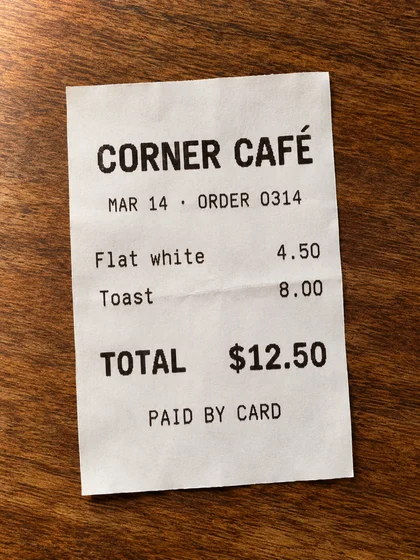
Flat white4.50
Toast8.00
TOTAL$12.50
For iPhone and Android · No account needed
Sign a school form without a printer. Send all your trip receipts as one attachment. Find an old receipt by typing the shop’s name. Paperlane does it all on your phone, with no account and no uploads.
Everyday uses
A form to sign, receipts to claim, a receipt to find and a handout to edit. Each example below works — try them on this page.
Monday, 7:42 am Shoes on, lunch packed — then: “The trip slip is due today.”
Scan the slip, type in your child’s name, sign with your finger and email it back to the school before you leave the house.
How signing on your phone worksSample · Permission slip
Wednesday, 5:15 pm Home from the trip. Finance wants every receipt — in one file, by Friday.
Scan the crumpled receipts from your wallet one after another, check the order, and send finance a single tidy attachment. Too big for their inbox? Paperlane makes a lighter copy and leaves the original untouched.
How to scan receiptsFriday, 2:03 pm The blender just died. Is it still under warranty? And where is that receipt?
Paperlane reads the text on every page you scan. Type a shop name, a person’s name, an amount or an order number, and it lists the documents that contain it.
How searching your scans worksNothing in this sample matches. Try “café” or “Jordan”.
Sunday, 8:30 pm The meeting is tomorrow. All you have is the printed handout.
Paperlane reads the printed page — the headings, the table, the pictures — and rebuilds it as a Word document or a PowerPoint deck you can actually edit. Change a time, fix a line, present it in the morning. It all happens on your phone; nothing is uploaded.
See how the page gets rebuiltWorkshop plan.docx · editable
A live demo followed by questions.
| Time | Activity |
|---|---|
| 9:00 | Welcome |
| 9:15 | Live demo |
| 9:40 | Q&A |
Workshop plan.pptx · slide 1
Drag to compare, then click any text on the right — go ahead, change it. Illustrative sample; give recognized text a quick check before you share.
Sharing & formats
The school wants a PDF. A colleague wants to make edits. The family chat just wants a picture. Give each of them what they need — and keep your original safe in Paperlane.
| Format | Going to | So that | Opens in |
|---|---|---|---|
| The school office, HR, the tax portal | All pages arrive in one file | Any device | |
| DOCX | A colleague with edits to make | They change it instead of retyping it | Word |
| PPTX | Tomorrow’s meeting | The handout becomes slides you can edit | PowerPoint |
| JPG | The family group chat | Anyone can open it, on any phone | Any device |
| PNG | Slides, notes and design files | Lossless image, no compression blur | Any device |
Every copy is made on your phone, and your original never changes. Compare export options ↗
Private by default
Passports, tax returns, medical letters and school forms carry personal details. Paperlane scans, reads and stores them on your phone. There’s no account and no Paperlane cloud. A copy leaves your phone only when you share it or back it up, to a place you choose.
Before you send it
Send only the pages that matter, shrink the file that won’t attach, lock the one with your bank details on it. Whatever you do to a copy, the version you scanned stays exactly as it was.
The application, the ID, the proof of address — one upload, the way the portal wants it.
Combine PDFsThey asked for page 7. Send page 7, not the whole 40-page lease.
Extract pagesMake a smaller copy when a file is too big to email.
Reduce file sizeA password on the copy that carries your bank details.
Share sensitive PDFsAdd text, highlights and drawings to any page.
Annotate a PDFTurn sideways pages upright and move pages into the right order.
Rotate pagesNo ads. No account. No clutter.
No sign-up screen, no pop-ups and no ads between you and your documents.
Yes. Keep adding pages to the same scan, put them in order, and save them together as one PDF.
Text recognition makes scans easier to find. Review corrections update library search text; they don’t rewrite the visible page or its PDF text layer. Word export can create an editable copy from recognized text.
Yes. Bring in PDFs and photos already on your phone, then combine, crop, rotate, sign and share them just like anything you scanned.
No. Your library lives on your phone, and nothing leaves it unless you share it or back it up — to wherever you choose.
Scan the first page, add the rest, and save them as one file you can sign, send or search later.